HTML reveals
An HTML reveal shows your own form, offer or checkout box under the player at a moment you choose.
Open the HTML reveal tool
Click HTML reveal in the Studio tool dock, or press R. Turn on the Enable HTML reveal switch in the panel header. The tool is available on Lite and Pro.
Set the time and write the HTML
- Reveal HTML at
- The time the box appears. It starts at 0:08.
- HTML under the player
- Your HTML. It shows in a box directly under the player.
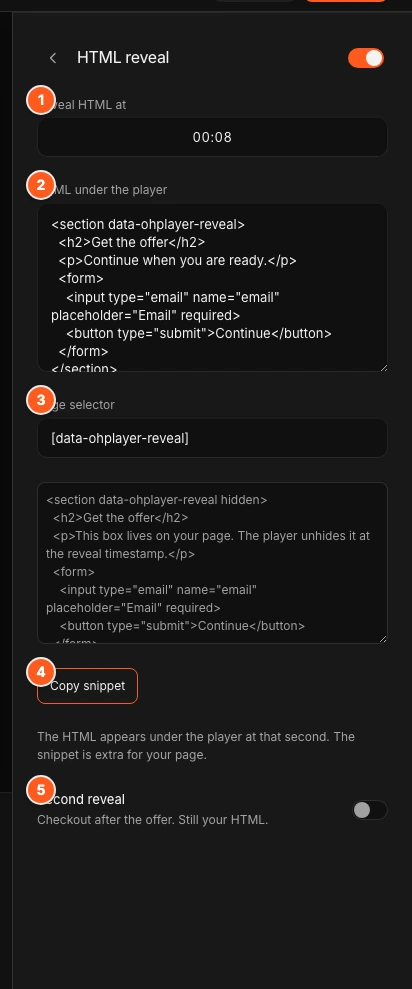
The sample HTML has an email form that does not send anywhere. Replace it with your own, and set the form’s action to the address that should receive it.
Optional: reveal something on your own page
Page selector is a CSS selector for elements already on your page. At the reveal time, OhPlayer removes the hidden attribute from every element that matches. The default is [data-ohplayer-reveal].
Click Copy snippet and paste it into your page. It is a hidden section, like this one, that appears when the reveal happens:
<section data-ohplayer-reveal hidden>
  <h2>Get the offer</h2>
</section>
Use this when the content must sit somewhere else on your page, or when you need a script or an embedded form that the reveal box does not allow. The page selector only works with the script embed. See Embed on your site.
Add a second reveal
Turn on Second reveal for a follow-up moment, such as “Checkout after the offer. Still your HTML.” It adds Checkout at, Checkout HTML and Checkout selector. The default checkout selector is [data-ohplayer-checkout].
Publish
Changes save as a draft. Click Publish to put them live. See Publish and share.
What the reveal box allows
For safety, OhPlayer removes these from your HTML before it shows:
<script>,<iframe>,<object>,<embed>and<style>tags- inline event handlers such as
onclick javascript:links
Keep your HTML to 8,000 characters or fewer. Longer HTML is replaced with the sample text. The box scrolls if it is taller than about 480 pixels.
Plain forms, links, text and images work. A reveal shows once and stays on screen. It does not hide if the viewer rewinds.
For developers
When a reveal happens, the page receives an ohplayer:reveal event on document. The event detail has videoId, t (the time in seconds), selector and beat (offer or checkout).
Next steps
Was this page helpful?
Your answer stays in your browser. Nothing is sent to us or to anyone else.